The CRM is the human side of the system: everyone who left details, signed up, bought or spoke with you. One person is one record — whether they came from a form, an import or a conversation — and everything else hangs off it.
From a form to a won deal: every step
This is the route someone walks from the moment they hit “send” to being a customer.
1Build the form for what it does — an enquiry, a webinar registration, a waitlist. The kind also decides which fields it starts with.Forms →
2Attach it to a product and a mailing list. From here everyone who fills it in is counted against the right product.
3Whoever fills it in is saved as a contact with their answers, and usually a deal opens on the board so the enquiry isn't forgotten. A newsletter form is the exception — it opens no deal.
4Move the card on the board as things actually happen. A board is worth exactly as much as it is current.Deals →
5When a deal is won, an active-client line opens beside it. “Sold” and “working with them now” are two different things, and the system keeps them apart.
6The same person arriving twice is one record. If two were created, merge them — one card with all the information.Contacts →
123
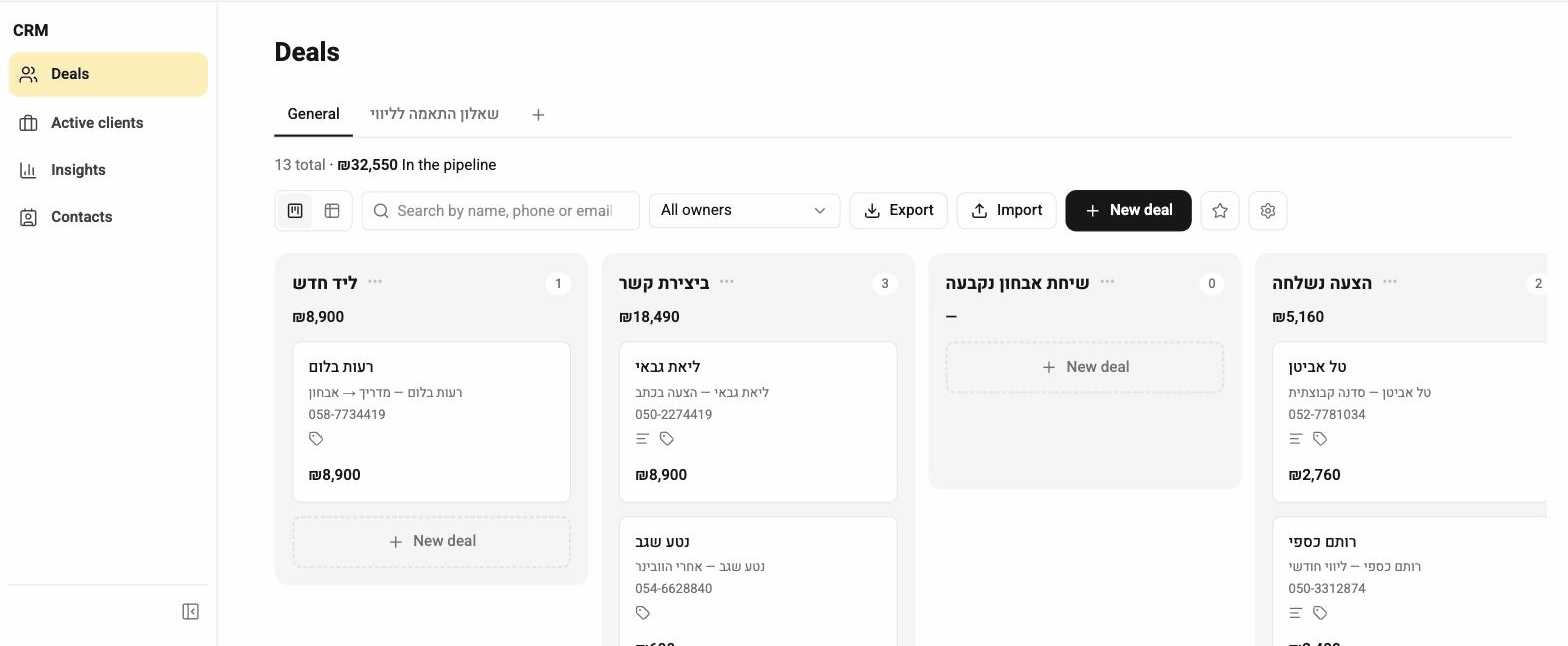
This board belongs to a demo account — the deals and names on it are not real.
1 — New deal — for a deal you open by hand, with no form behind it
2 — Each column is a stage; the header says how many deals and how much money
3 — A deal card: who, how much, where they came from — drag it to the next stage
Where do contacts come from?
From anything that collects details: a form, a questionnaire, a landing page, a list sign-up, a booking, an import from a file or a connected system, and manual entry.
Someone who arrived from several places is still one record. The sources are kept on it, so you can see how they first came in.
Merge them. After merging there's one card holding all the information from both sources — not two versions, and not a toggle between them.
Most of the time matching on email address prevents the duplicate in the first place; it happens when the same person left two different addresses.
How does the deals board work?
Each deal is a card moving through columns — enquiry, call, proposal, won, lost — and you can rename and reorder the columns to match your own process.
Every deal has a contact, a product and an amount. When a deal is won, an active-client line opens alongside it — so the system can tell “sold” apart from “currently working with”.
They're saved as a contact with their answers, and usually a new deal opens on the board so the enquiry isn't forgotten. A newsletter sign-up form is the exception — it doesn't open a deal.
If the form is connected to a mailing list and a funnel, they also join the list and start receiving the sequence.
Can I import contacts and deals from a file?
Yes, both have an importer. Upload a file, map the columns, confirm.
The import matches existing people by email rather than creating them again, so you can re-run an updated file without duplicating anyone.