The product is the starting point, not an appendix. A product is not a page — it's the business record of what you sell: its type, its price, and the ways people buy it. Pages, forms, lists and content attach to it, so instead of guessing from view counts you can see who was exposed, who left details and who bought.
Right now my product is 1:1 coaching. Can I make a page for a single session with a price on it?
Asked
Yes — and they're two separate things worth separating in your head: the product is the record, the page is how it's bought.
1. Define the single session as its own product: Products → New product → type “Meeting / appointment” → price. It's separate from the full coaching package, because they're different in price and in meaning.
2. Build it a booking page: Funnels → Booking pages. That's where you set the session length and your available hours; whoever lands picks a time and leaves their details.
3. To have them pay up front — connect a payments account under Settings → Integrations and price the page. Then they pay, and the slot is only held after payment.
4. Link the page to the product. From then on the product page shows how many arrived, how many booked and how many paid — instead of you having to remember.
If you'd rather not expose an open calendar, a landing page with an enquiry form is a legitimate alternative. The difference is that you set the time in conversation rather than them picking it in your calendar.
123
1 — Products, in the top nav
2 — New product — opens the setup dialog
3 — Or upload a pricelist you already have
123
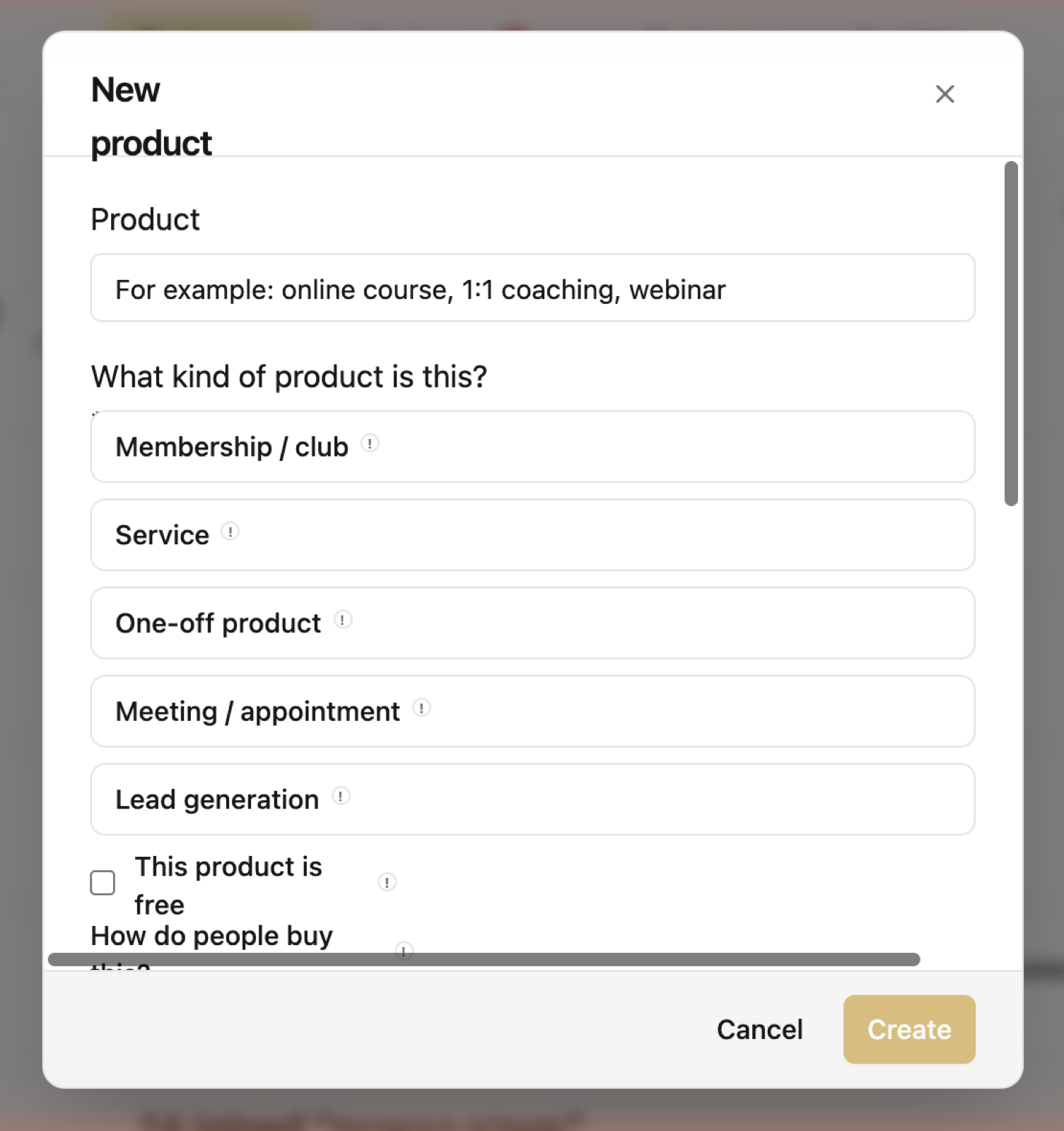
For a single session pick “Meeting / appointment” — that's the type a booking page with hours and a price hangs off.
1 — Product name
2 — Meeting / appointment — the type for a single session
3 — How do people buy this — what decides what gets counted
Because once a product exists, everything else can point at it: this form belongs to it, this landing page promotes it, this list was built for it, this deal is about it.
That's where the only question that matters comes from: what actually brings buyers. Without a product, every number in the system is a general number.
You don't have to define everything on day one. One product — the one that makes you money today — is enough to start.
What does the product type mean?
The type tells the system how to read what happens around it. Membership / club — people join and leave over time. Service — you work with a client over a period. One-time product — bought once. Meeting / appointment — a time is booked. Lead gen — free, and meant to bring enquiries.
The type affects what counts as “success” and how results are tallied. You can change it later — history already recorded doesn't change.
What is “how do people buy this”, and why am I being asked?
Because Coflow can only count a path it's connected to. If they buy through a payment page, a form, a list or a conversation tracked in the CRM — that's counted. If they buy on an external site or in a DM, it happens outside its view.
Marking this is what lets the system tell you honestly “this I can count, this I can't”, instead of showing a partial number as if it were complete.
What do I see on a product's page?
The journey: exposure (the assets that show it), drive to sale (what pushes toward it), leads (who left details) and customers (who bought).
Below that — who those people actually are, where they came from, and what happened around the product recently.
A number that can't be known shows as “can't count yet”, not as zero. That's deliberate: the difference between “didn't sell” and “sold somewhere I can't see” is the difference between a right and a wrong decision.
Tracked links. Instead of sending the same URL from everywhere, the system makes a separate link per source — a story, your bio, a DM automation, an email — and counts each one separately.
They show on the product page, and they're what builds the “most came from…” line. It's also what turns “Instagram works for me” from a feeling into something you know.
I already have a pricelist. Do I have to retype everything?
No. Upload the pricelist — PDF, image, CSV or Word — and the system pulls the services and prices out of it and shows them for your approval before anything is saved.
It's the fast way to fill a whole catalogue on day one.