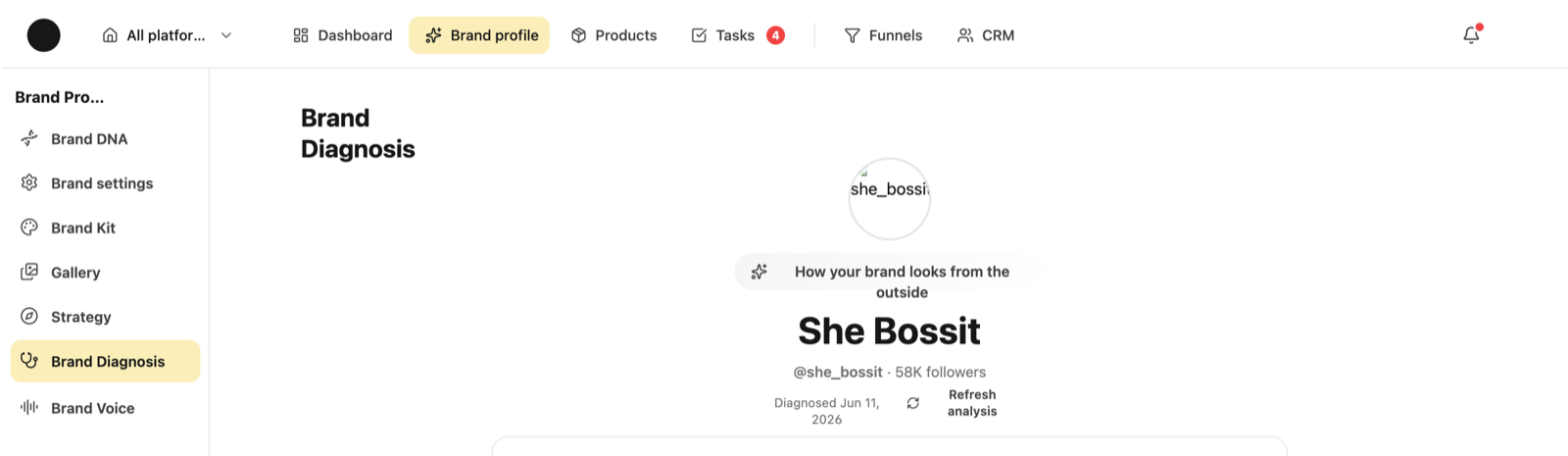
Instagram is the platform the most leans on: the diagnosis reads from it, the metrics come from it, and templates are learned from real posts. So two things have to be right before anything else — the handle in settings, and the official connection.
I connected Instagram and got no analysis. Why?
Asked
Check these in order — it's almost always one of the three.
1. The handle. Open the platform's settings and make sure it holds exactly your page handle — no @, no full URL, and with the dots if there are any (my.brand, not mybrand). A wrong handle makes the scan run on another page or on nothing, and the result looks like “not enough content”.
2. The official connection. Typing a handle is not connecting. Without “Connect to Instagram” there's no access to the data Instagram only shows you.
3. Re-run it. Once that's fixed, open the brand diagnosis and hit “Refresh the analysis”. The scan runs again and the screen fills in over a minute or two.
1
1 — Refresh analysis — re-scans and rebuilds the diagnosis
It says “there's nothing to analyse from one post” — but I have plenty of posts and reels.
Asked
That sentence describes what the scan managed to read, not what's on your page. If it pulled one post, the analysis was written on one post — correctly, because one post tells you nothing about a pattern.
The usual causes: a wrong handle in settings, a private page that can't be read from the outside, or a scan that stalled and was recorded as if it finished.
What to do: fix the handle, make sure the page is public, and run “Refresh the analysis”. If it still reads one post after that, it's a bug and worth reporting with the handle you entered.
What exactly do I get from the page analysis?
Two parts. Outside-in perception — how your brand reads to someone landing on you for the first time, based on what's written and what went out.
And a page audit: what isn't working and what it costs you, what is working (with the posts that prove it), and what to fix this week in priority order.
It is not a metrics report. Numbers live on the platform's dashboard and analytics.
Why don't I have views on the dashboard?
Views and reach are private data — Instagram only shows them to the account owner. They arrive exclusively through the official connection.
Likes, comments, followers and recent posts are readable without connecting, because they're visible on the page.
After a first connection the numbers don't appear immediately — they land on the next sync.
What can the system produce — carousels, reels, or both?
Both, and the anchor decides. A post-type anchor produces an image or a carousel of slides; a reel-type anchor produces a short video with an on-screen hook, built from the clips in your gallery.
A carousel downloads as images at the right size for Instagram, and a reel as a video file. The caption copies with one click.
Is there a library of ready-made templates?
Yes, and you can also build your own from a post you liked. A ready template is a fast starting point; one learned from your own reference will look more like you.
Either way the colours and fonts come from your Brand Kit, so the output doesn't look like a stock template.
What is the “link in bio” page and how do I build it?
It's a small public page on your address that gathers everything you point at from your bio — a landing page, a form, a booking page, your latest episode, a product.
You edit it on the “Link in bio” screen in the platform workspace: preview on one side, settings on the other, and what you save goes public only when you publish the changes.
Does the system learn what actually worked for me?
Yes. Your posts' performance is read and stored, and once there are enough samples the system picks up patterns — which hook type, which length, which anchor gets a response.
What it needs from you is time and consistency: without dozens of measured posts there's nothing to learn from. In the early weeks it leans on the references you gave rather than on “what worked”, because there isn't one yet.
My page is private. Does that matter?
Yes. A private page can't be read from the outside, so the diagnosis, references from your own page and public metrics won't work.
If the page is a public business account and still isn't being read, the handle is probably wrong rather than the Instagram setting.
Want to see it from the inside?
The academy is in the product too, with a direct link to every screen an answer mentions.