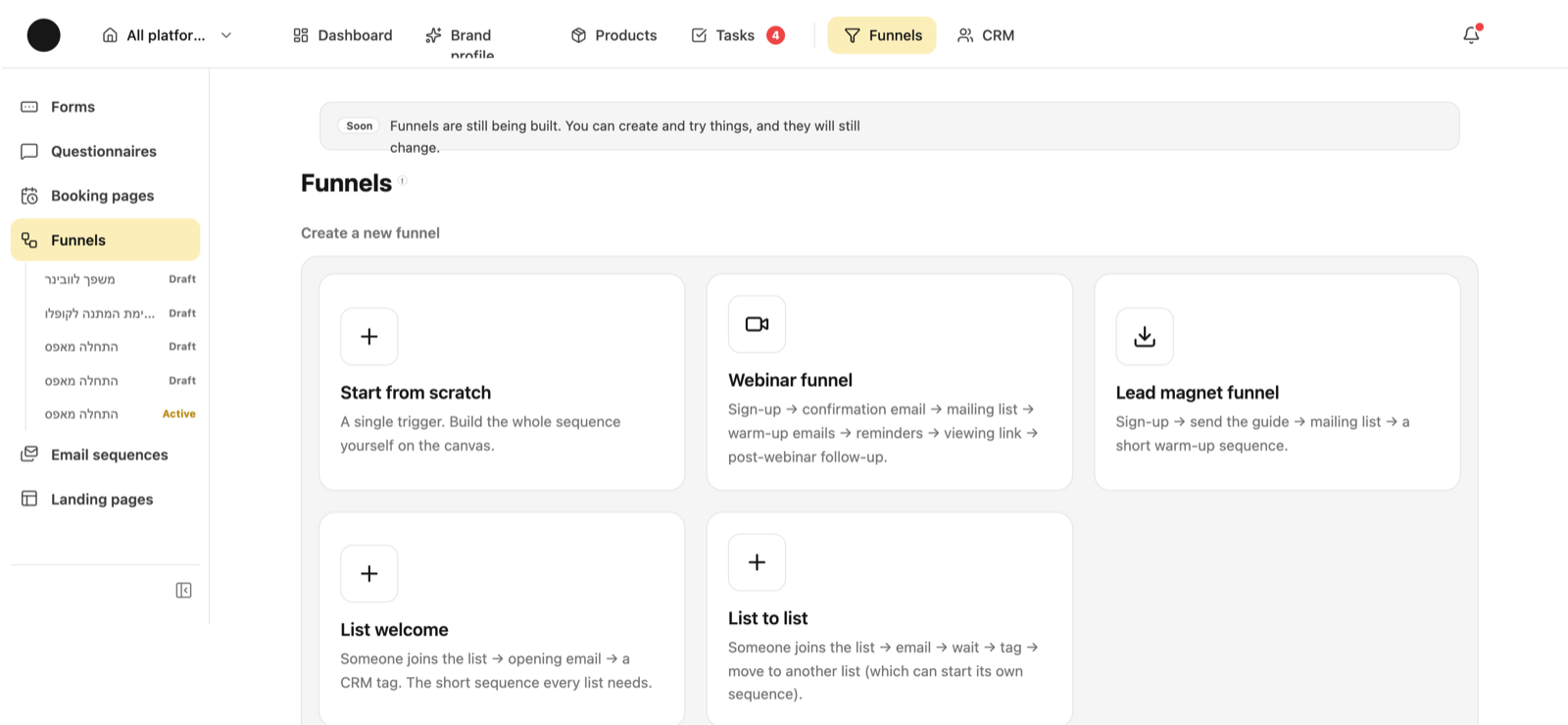
A funnel in Coflow isn't a diagram of your campaign — it's what runs automatically from the moment someone leaves their details: which emails they get and when, which list they join, which tag sticks to them. Everything before that moment (ads, stories, a WhatsApp group) stays outside, and the funnel picks up exactly where they come in.
What does “funnel” actually mean here?
Asked
A funnel is an automatic sequence of actions that runs on a person. It starts from a trigger — someone submitted a form, or someone joined a mailing list — and continues in steps: send an email, wait two days, add a tag, move them to another list, branch on a condition, end.
What it isn't: it doesn't advertise, doesn't run groups, doesn't send WhatsApp and doesn't buy media. Those happen outside the system.
The right way to think about it: “what do I want to happen on its own once someone left me an email?” — that's the funnel.
I run a WhatsApp challenge advertised on Facebook: people join a group, get emails, and there's a webinar at the end. What do I build in the system?
Asked
Start with the split: the Facebook ad, the WhatsApp group and everything happening inside it stay outside — Coflow doesn't touch them. What comes in is everything that starts at the moment of sign-up.
1. A landing page or a sign-up form. That's the entry point the ad sends people to. It collects the email, and it's where the WhatsApp group link appears — on the confirmation, after signing up. That way you get both a group member and an email address, instead of only a group member.
2. A mailing list for the challenge. Everyone who signs up joins it, and that's what lets you email them all and see how many registered.
3. A funnel triggered by that form: confirmation email with the group link → add to the list → your warm-up emails spaced out → a webinar reminder → a follow-up email afterwards. You can start from the ready-made webinar template and change everything in it.
4. A product and tags. If the challenge leads to a sale, define what's being sold as a product and attach the page and form to it — then you can see how many registered, how many showed up and how many bought, instead of guessing.
5. What stays manual: the group activity, the webinar itself, and the ad. The webinar watch link is just a URL inside an email.
12
For a challenge that ends in a webinar, the webinar template is the starting point — and everything in it can be changed.
Two triggers: someone submitted a specific form, or someone joined a specific mailing list. You can also start a funnel manually for one person.
There's no “purchased”, “watched a story” or “joined a WhatsApp group” trigger. If something like that should start a sequence, the way in is to add the person to a list — and the list starts the funnel.
What steps can a funnel contain?
Send an email, wait (hours or days), add to and remove from a mailing list, add and remove a tag, a yes/no condition, jump to another funnel, and end.
The condition is what makes a funnel smart: “are they tagged ‘bought’?” — if yes, end; if no, continue to the reminder email.
What's the difference between a funnel and an email sequence?
An email sequence is the simple special case of a funnel: a series of emails with gaps between them, starting when someone joins a list. No canvas, no conditions, no branches — just emails and timing.
A funnel is the full canvas, with conditions, tags and moving people between lists.
Start with a sequence. Move to a funnel when you genuinely need a condition.
What's the difference between a form and a questionnaire?
A form collects details and ends: sign-up, contact, webinar registration, waitlist, newsletter, an application.
A questionnaire asks questions and returns an answer: a fit quiz that routes each person to what suits them. It can branch on answers and finish on different ending screens.
Either way, whoever fills it in is saved in your contacts, and their answers are stored with them.
I want people to book a meeting with me directly. How?
A booking page. You set the meeting length and your available hours; whoever lands picks a day and time and leaves their details.
If you connected Google Calendar, the meeting is written into it and availability respects what's already in your calendar.
You can also price the meeting and take payment — that needs a payments account connected under Settings → Integrations. Then whoever books pays before the slot is held.
I changed something and it isn't showing on the page. Why?
Because the editor saves a draft. The live version is the published one, and it only updates when you hit “publish changes”. That's true for pages, forms, booking pages and sequences.
It's deliberate: you can edit a live page without anyone seeing a half-finished edit.
What do draft / active / paused mean?
Draft — the funnel exists but isn't running on anyone. Active — anyone who hits the trigger enters it from now on. Paused — it stops taking new people.
A funnel built and left in draft is the classic failure: the form works, people come in, and no emails go out because nobody switched it on.
How do I know the funnel actually works?
Test it as a user: fill in the form yourself with a different email address, and check that the first email arrives and that you show up in the right list and in your contacts.
After that, the funnel screen shows how many entered and how many reached each step — that's where you see where people drop.
Make sure your sender address is set up and verified before testing, or no emails go out at all.
Want to see it from the inside?
The academy is in the product too, with a direct link to every screen an answer mentions.